Isaiminia World Breaking News & Top Stories
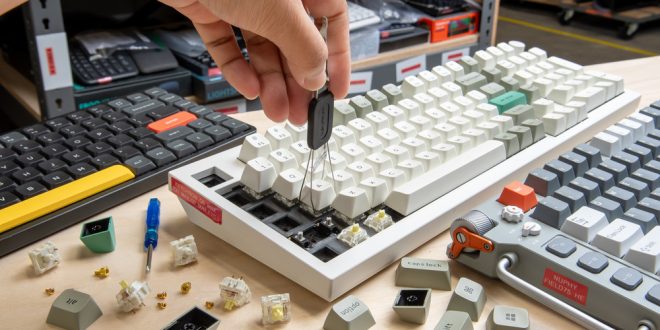
The allure of the custom mechanical keyboard lies in its ability to provide a typing experience tailored to individual preferences. Enthusiasts often delve into custom builds, aiming to create keyboards that not only meet functional needs but also reflect personal style.
Understanding Your Preferences
Before embarking on the journey of building a custom mechanical keyboard, it is crucial to understand what you want from your board. Consider its primary use: is it for gaming, typing, or both? Your usage will guide decisions about the type of switches, keycaps, and layout that will best suit your requirements.
Choosing the Right Keyboard Layout
Keyboard layouts vary from full-sized boards to more compact options like tenkeyless (TKL) or 60%. Full-sized keyboards include a number pad, while TKL removes it for a smaller footprint. On the other hand, 60% keyboards omit both the number pad and function keys for maximum space efficiency. Your choice will depend on personal preference and desk space considerations.
Key Switch Types
Mechanical keyboards are praised for their switches, which provide distinct tactile feedback compared to membrane keyboards. There are three main types of switches: linear, tactile, and clicky. Linear switches, like Cherry MX Red, offer smooth keystrokes. Tactile switches, such as Cherry MX Brown, provide a slight bump mid-press. Clicky switches, like Cherry MX Blue, have an audible click with each press.
Selecting Keycaps
Keycaps are one of the most visible parts of a keyboard, and they offer vast opportunities for customisation. Material plays a significant role in the feel and durability of the keycaps. ABS plastic is less expensive but prone to shine over time. In contrast, PBT plastic is more durable and retains texture. The profile of the keycaps can also affect typing feel, with common profiles including OEM, Cherry, and SA.
The Importance of the Case and PCB
The case of your keyboard not only influences aesthetics but also affects acoustics and typing feel. Options range from plastic to metals like aluminium or brass. Meanwhile, the printed circuit board (PCB) is the backbone of your keyboard, determining layout capabilities and switch compatibility.
Understanding Stabilizers
Stabilizers are components that ensure larger keys, such as the spacebar or enter key, press down evenly without wobble. Quality stabilizers are crucial for creating a satisfying typing experience. Consider plate-mounted or PCB-mounted stabilizers in your build.
Assembly and Soldering
For those willing to engage further, assembling a custom mechanical keyboard can involve soldering switches to the PCB. This process allows for greater control over switch placement and connection but requires careful attention to detail to avoid damaging components.
Tools and Accessories
Building a custom keyboard necessitates specific tools such as a soldering iron, keycap puller, and switch opener. Accessories like wrist rests and custom cables can enhance both the ergonomic and aesthetic appeal of your setup.
Sound Dampening and Personal Modifications
Many enthusiasts add sound dampening materials within the case to reduce noise and improve typing acoustics. Foam, rubber mats, or silicone can be strategically placed under the PCB. Additional modifications might include lubing switches or using custom spring weights.
The Role of Firmware
Configurable keyboard firmware, such as QMK or VIA, enables users to customise key functions, macros, and even RGB lighting layouts. This flexibility is a core advantage of custom mechanical keyboards, supporting unique user interfaces beyond standard offerings.
Conclusion
Building a custom mechanical keyboard is a rewarding endeavour that allows for personal expression through both form and function. Although the process requires time and investment, the result is a bespoke tool tailored precisely to one’s preferences. Companies such as Keebz N Cables offer comprehensive kits and components to support your journey into the world of custom keyboard creation.
Engaging in the creation of a custom mechanical keyboard allows users not only to learn about technology and design but also to end up with a piece of equipment that showcases their unique taste and needs.