Isaiminia World Breaking News & Top Stories
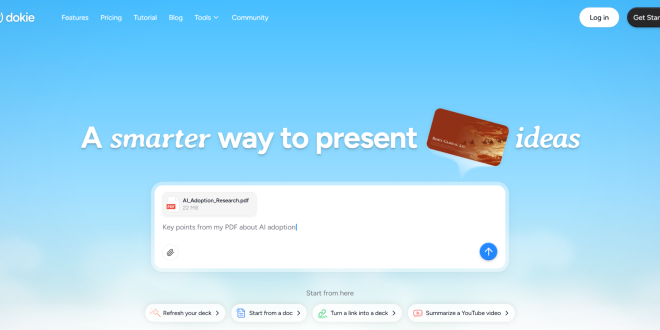
What is Dokie AI?
Dokie AI is an AI presentation maker designed to turn raw content into structured slide decks.
Instead of focusing on visual effects, it focuses on workflow efficiency. That means helping users:
- Start faster
- Structure content better
- Finish presentations quicker
It’s especially useful for people who already have content (documents, reports, notes) and need to convert it into slides.
A Different Approach to AI Presentations
Most AI PPT tools follow this logic:
👉 “Let’s generate something creative.”
Dokie AI follows a different logic:
👉 “Let’s generate something usable.”
This small difference leads to a big change in output quality.
Instead of flashy slides, you get:
- Clear structure
- Logical flow
- Presentation-ready content
Key Features
1. Content-to-Presentation Workflow
Dokie AI is not just about generating slides from prompts. It is designed to work with real content.
You can take:
- A report
- A document
- Raw notes
And turn them into a presentation.
This makes it ideal for real work scenarios.
2. Powerful Free AI PPT Tools
Dokie AI provides a full set of tools that convert different formats into presentations:
- PDF to PPT
- Word to PPT
- Text to PPT
- Excel to PPT
- JPG to PPT
- PNG to PPT
- HTML to PPT
There is also a document-to-PPT tool that helps convert longer content into structured slides.
This feature set makes Dokie AI a strong choice for content repurposing.
3. Logical Slide Structure
One of Dokie AI’s biggest strengths is how it organizes slides.
Instead of random content, it creates:
- Clear sections
- Consistent flow
- Easy-to-follow slides
This is especially useful for:
- Business reports
- Strategy presentations
- Internal updates
4. Fast Draft Creation
Dokie AI helps you move quickly from idea to draft.
You can:
- Enter a topic
- Generate a full presentation
- Edit and finalize
This reduces the time spent on initial creation.
5. PowerPoint Export
Dokie AI supports exporting to PowerPoint, which is still the most widely used format in business.
This ensures:
- Easy sharing
- Compatibility with existing templates
- Smooth team collaboration
Real Workflow Example
Let’s say you have a marketing report.
Normally, you would:
- Read the report
- Summarize key points
- Build slides manually
With Dokie AI, you can:
- Upload or paste the content
- Generate slides automatically
- Edit and present
This saves time and reduces manual work.
Where Dokie AI Performs Best
1. Repetitive Slide Work
If you create similar presentations every week, Dokie AI can automate much of the process.
Examples:
- Weekly reports
- Monthly reviews
- Campaign updates
2. Turning Content into Slides
Dokie AI is especially strong at converting existing content into presentations.
This is useful for:
- Blog posts
- Internal documents
- Research summaries
3. Fast Deadlines
When you don’t have time to build slides from scratch, Dokie AI gives you a solid starting point.
Pros and Cons
Pros
- Strong workflow efficiency
- Excellent for content repurposing
- Clear and logical slide structure
- Multiple file-to-PPT tools
- Fast generation
Cons
- Limited design customization
- Not focused on visual creativity
- Fewer design templates
Dokie AI vs Traditional PPT Workflow
Traditional Workflow
- Start from blank slides
- Build structure manually
- Write content
- Format everything
Dokie AI Workflow
- Input content or topic
- Generate full draft
- Edit and finalize
The difference is not just speed—it’s reduced mental effort.
Who Should Use Dokie AI?
Dokie AI is ideal for:
- Professionals who create slides frequently
- Teams working with reports and data
- Anyone who wants to save time
It works especially well if you:
- Already have content
- Need structured slides
- Work in a business environment
Who Should Skip It?
Dokie AI may not be the best fit if you:
- Need highly creative designs
- Focus on visual storytelling
- Want full design control
Key Takeaway
Dokie AI is not trying to replace design tools.
Instead, it replaces the most time-consuming part of presentations:
👉 Turning content into structured slides.
Final Thoughts
Dokie AI is a workflow-first AI PPT maker that helps you create presentations faster with less effort.
If your goal is to save time and improve efficiency, it is one of the most practical tools you can use.
FAQs
1. What makes Dokie AI different?
It focuses on workflow efficiency and structured slides instead of design-heavy outputs.
2. Can Dokie AI convert documents into presentations?
Yes, it supports multiple formats including PDF, Word, Excel, and more.
3. Is Dokie AI suitable for business use?
Yes, it is designed for business presentations and reports.
4. Does Dokie AI support PowerPoint export?
Yes, you can export presentations directly to PowerPoint.
5. Is Dokie AI easy to use?
Yes, it is beginner-friendly and requires minimal setup.