Isaiminia World Breaking News & Top Stories
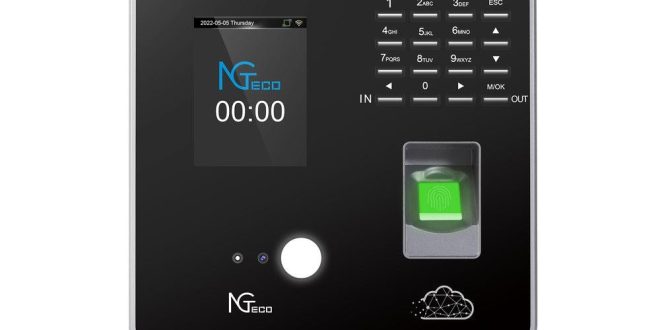
Every organization with hourly workers faces a persistent threat: time theft. Traditional paper timesheets invite manipulation, while basic digital systems using PINs or swipe cards remain vulnerable to “buddy punching,” where one employee clocks in for another. The financial impact is staggering—studies estimate that buddy punching alone costs U.S. employers hundreds of millions annually in inflated payroll. Beyond the direct monetary loss, inaccurate attendance records create compliance nightmares, exposing companies to labor law violations and failed audits. For IT specialists tasked with safeguarding organizational systems, the challenge is clear: how do you deploy an attendance solution that is genuinely tamper-proof while remaining practical to manage across multiple locations and scalable as the workforce grows? The answer lies in a powerful convergence of two technologies. Modern small time clocks equipped with biometric authentication—facial recognition and advanced fingerprint scanning—eliminate identity fraud at the point of entry. When paired with secure cloud storage, these compact devices transmit encrypted attendance data to a centralized, always-accessible platform that integrates directly with payroll and HR systems. Together, they form an end-to-end security architecture that transforms attendance from a vulnerability into a strength.
Understanding Modern Small Time Clock Technology
The term “small time clock” no longer refers to a simple wall-mounted punch device. Today’s compact time clocks are sophisticated networked endpoints—often no larger than a tablet—that combine processing power, multiple connectivity options, and advanced sensors into a single, mountable unit. Unlike legacy systems that merely stamped a card or logged a button press, modern devices actively verify identity, process data locally, and transmit encrypted records to remote servers in real time. This fundamental shift transforms the time clock from a passive recording tool into an active security checkpoint.
The architecture of a modern attendance security system rests on three interdependent pillars. First, the physical hardware must be durable, compact enough for flexible placement, and equipped with the processing capability to handle biometric algorithms on-device. Second, the authentication method—whether facial recognition, fingerprint scanning, or a combination—must be sophisticated enough to resist spoofing while remaining fast enough to avoid bottlenecks during shift changes. Third, the cloud data layer provides centralized storage, real-time synchronization across locations, and seamless integration with downstream payroll and HR platforms.
For IT specialists, understanding this three-layer model is essential because each component introduces distinct security considerations and integration requirements. The hardware demands network infrastructure planning—reliable Wi-Fi or Ethernet at every mounting point. The biometric layer requires secure template management and privacy compliance. The cloud layer necessitates encryption protocols, access governance, and API compatibility with existing enterprise software. IT professionals are uniquely positioned to architect this system holistically, ensuring that no single layer becomes a weak link in the attendance security chain. Getting this architecture right from the outset prevents costly rework and guarantees that the system scales gracefully as organizational needs evolve.
Eliminating Fraud with Advanced Biometric Authentication
PINs and swipe cards have long served as the default authentication methods for time clocks, but their fundamental weakness is obvious: they verify credentials, not people. A four-digit code can be shared over text message, and a proximity card can be handed to a coworker in the parking lot. No amount of policy enforcement fully eliminates these behaviors because the technology itself cannot distinguish between the authorized holder and an imposter. Biometric authentication closes this gap permanently by tying clock-in events to unique physiological characteristics that cannot be transferred, duplicated, or forgotten.
The Rise of Face ID Time Clocks
Facial recognition in modern time clocks operates through structured infrared light or depth-sensing cameras that map thousands of geometric points on an employee’s face, creating a mathematical template rather than storing an actual photograph. Critical to security is liveness detection—algorithms that analyze micro-movements, skin texture, and three-dimensional depth to reject printed photos, video replays, or silicone masks. This makes spoofing extraordinarily difficult even with sophisticated attempts. Hardware manufacturers like NGteco have developed compact devices that incorporate these advanced IR-based facial recognition capabilities into sleek, wall-mountable form factors suitable for diverse work environments. From an operational standpoint, face ID clocks offer a completely touchless experience, which improves hygiene in food service, healthcare, and manufacturing environments. Recognition typically completes in under one second, preventing queues during high-traffic shift transitions. For IT teams, deployment considerations include ensuring consistent ambient lighting near the device—or selecting models with built-in IR illumination—and confirming that network bandwidth supports the initial enrollment process, which transmits larger data packets than routine clock events.
Leveraging Advanced Fingerprint Recognition
Fingerprint technology has matured well beyond the optical scanners of the early 2000s, which could be fooled by gelatin molds or high-resolution prints. Current capacitive and multispectral sensors read sub-dermal fingerprint layers, detecting the living tissue beneath the skin’s surface. This renders fake fingerprints ineffective and maintains accuracy even when fingers are dry, calloused, or slightly dirty—a common scenario in industrial and retail settings. The deterrence factor is significant: employees who know that their unique fingerprint is the only way to register attendance simply stop attempting workarounds. From an IT security perspective, fingerprint templates are stored as encrypted mathematical hashes, not actual images, meaning a data breach cannot reverse-engineer a usable fingerprint. IT administrators should evaluate whether templates reside solely on the device or are synchronized to the cloud, ensuring that the chosen approach aligns with organizational data governance policies. Enrollment is straightforward—typically requiring three scans per finger—and can be completed during onboarding without specialized equipment beyond the clock itself, making fingerprint recognition a highly cost-effective yet robust option for most workforce environments.
Securing and Managing Data with Cloud Storage
For years, attendance data lived on local servers or even on the time clock devices themselves—an approach fraught with risk. A single hardware failure, theft, or natural disaster could wipe out months of records critical for payroll processing and compliance audits. On-premise servers also demanded ongoing IT attention: patching, backup scheduling, physical security, and capacity planning as the workforce expanded. The migration to secure cloud storage eliminates these burdens while introducing a level of data protection that most organizations cannot replicate in-house.
Cloud-based attendance platforms encrypt data both in transit and at rest, typically using AES-256 encryption paired with TLS 1.2 or higher for transmission. This means that even if network traffic is intercepted or a storage breach occurs, the attendance records remain unreadable without the corresponding decryption keys. Role-based access controls add another critical layer, allowing IT administrators to define precisely who can view, export, or modify attendance data. A shift supervisor might see only their team’s records, while a payroll manager accesses aggregated hours across departments—and neither can alter raw clock events. Automated backups run continuously in geographically redundant data centers, ensuring that no single point of failure can compromise data availability.
Beyond security, cloud storage functions as the operational nerve center of a distributed attendance system. Each small time clock—whether installed at a headquarters lobby, a remote warehouse, or a retail storefront—pushes verified clock events to the same centralized platform within seconds. This real-time synchronization gives managers immediate visibility into attendance patterns across every location without waiting for end-of-day file transfers or manual exports. The cloud platform then feeds this consolidated data directly into payroll engines and HRIS platforms through pre-built integrations or RESTful APIs, eliminating manual data entry and the transcription errors that accompany it. As the organization grows, adding new devices or locations requires no additional server infrastructure—just provisioning within the cloud dashboard. Remote accessibility means IT teams can monitor system health, push configuration updates, and resolve issues from anywhere, dramatically reducing the need for on-site intervention.
Implementation Guide for IT Specialists
Deploying a biometric time clock system with cloud storage is not a single event—it is a structured process that demands careful planning, controlled execution, and sustained oversight. The following phased approach provides IT specialists with a concrete framework to move from legacy attendance tracking to a secure, integrated, and scalable architecture without disrupting daily operations.
Phase 1: Assessment and Planning
Begin with a thorough audit of existing systems. Document every touchpoint where attendance data currently flows—from the clock device through any middleware into your HRIS and payroll platforms. Identify the specific APIs, file formats, or manual processes that connect these systems, because your new solution must either replicate or improve each connection. Next, catalog compliance requirements relevant to your jurisdictions: overtime calculation rules, break-time mandates, record retention periods, and any biometric data privacy laws such as BIPA in Illinois or GDPR in European operations. These regulations will dictate how you handle template storage, consent workflows, and data retention policies. Conduct a site-by-site network infrastructure assessment, measuring Wi-Fi signal strength and Ethernet availability at every proposed mounting location. Weak connectivity at a single clock point can create data gaps that undermine the entire system’s reliability. Finally, evaluate your workforce environment to determine the optimal biometric modality. Face ID suits touchless requirements in healthcare or food processing, fingerprint works well in office and retail settings, and a hybrid approach accommodates environments where employees may wear gloves or face coverings intermittently.
Phase 2: Deployment and Integration
Resist the temptation to deploy across all locations simultaneously. Instead, select one representative site—ideally one with cooperative management and a manageable headcount—for a pilot program lasting two to four weeks. During the pilot, configure the cloud platform’s security settings: establish role-based access hierarchies, enable AES-256 encryption at rest, enforce TLS 1.3 for data in transit, and define data retention schedules aligned with your compliance audit. Integrate the time clock platform’s API with your payroll engine and HRIS during this phase, validating that clock events translate correctly into hours worked, overtime flags, and absence codes. Test edge cases—missed punches, shift swaps, multi-location employees—to confirm the system handles exceptions gracefully. If your organization uses Single Sign-On, configure SAML or OAuth integration so administrators access the attendance dashboard through existing identity providers without maintaining separate credentials. Document every configuration decision in a deployment playbook that subsequent site rollouts can follow precisely, reducing per-site setup time dramatically.
Phase 3: Training and Ongoing Management
Technology adoption hinges on user confidence. Develop two distinct training tracks: one for system administrators covering dashboard navigation, alert configuration, and troubleshooting procedures, and another for end users focused solely on enrollment and daily clock-in interaction. Keep employee-facing materials visual and brief—a laminated quick-start card mounted near each device often outperforms lengthy manuals. On the operational side, configure automated reports that surface anomalies: repeated failed authentication attempts, clocks that lose connectivity, or unusual patterns like consistent early departures. Set threshold-based alerts that notify IT immediately when a device goes offline or when data synchronization lags beyond acceptable limits. Establish a quarterly audit protocol where you review access logs, verify that terminated employees have been purged from the biometric database, confirm encryption certificates remain current, and validate that cloud backups restore successfully. Schedule firmware and software updates during low-traffic windows, testing each update in your pilot environment before propagating across the fleet. This disciplined maintenance cadence ensures the system remains secure and performant long after initial deployment excitement fades.
Building a Future-Ready Attendance Security Architecture
The journey from vulnerable paper timesheets and easily shared PINs to a fortified attendance infrastructure represents more than a technology upgrade—it is a fundamental shift in how organizations protect their payroll integrity and workforce data. By combining biometric small time clocks that verify identity through irreplicable physiological traits with cloud storage platforms that encrypt, centralize, and safeguard every clock event, IT specialists can deliver a system where fraud is not merely discouraged but rendered structurally impossible. The operational gains extend well beyond security: real-time synchronization eliminates manual data handling, pre-built integrations streamline payroll processing, and centralized dashboards replace the fragmented oversight that plagued legacy deployments. Scalability becomes effortless when adding a new location requires only mounting a device and provisioning it through a cloud console rather than expanding server capacity. Perhaps most importantly, this architecture creates a future-ready foundation. As workforce management evolves—incorporating AI-driven scheduling, predictive analytics, and deeper HRIS automation—the secure data pipeline established today ensures your organization can adopt tomorrow’s innovations without rebuilding from the ground up.