Isaiminia World Breaking News & Top Stories
It starts subtly — a dull ache in your lower back around the third hour of your workday. By the time you switch from spreadsheets to your evening gaming session, that ache has become a persistent throb that follows you to bed. If this sounds familiar, you’re far from alone. Millions of home office workers are discovering that the makeshift seating arrangements they tolerated during the initial remote work boom are now taking a serious toll on their bodies.
The rise of hybrid work-gaming spaces has created a unique challenge. More people than ever are using the same desk and chair for back-to-back professional tasks and leisure gaming, demanding furniture that can handle both worlds without compromise. Unfortunately, most standard chairs — whether a budget office chair or a flashy racing-style seat — fall short of delivering the sustained support these long hours demand.
The good news is that ergonomic chairs designed specifically to address back pain are more accessible and versatile than ever. This guide is written for home office workers who also game, helping you understand what features genuinely matter, how to evaluate your options, and which chairs offer the best combination of health benefits and everyday versatility.
The Importance of Ergonomic Support for Home Office Workers
Back pain has become one of the most common complaints among home office workers, and the reasons aren’t hard to pinpoint. Without the structured environment of a traditional office, many people default to dining chairs, sofas, or bargain desk chairs that offer little structural support. Hours spent hunched over a laptop or craning toward a monitor gradually strain the lumbar region, tighten hip flexors, and compress spinal discs in ways the body simply wasn’t designed to handle for eight or more consecutive hours.
For those who transition directly from work tasks to gaming sessions, the problem compounds. A two-hour gaming session tacked onto a full workday means your spine may be under load for ten to twelve hours with minimal relief. This pattern doesn’t just cause temporary soreness — it can lead to chronic conditions like herniated discs, sciatica, and persistent muscle tension that interfere with sleep and daily function. Ignoring these warning signs in favor of pushing through is a gamble that rarely pays off long-term.
This is precisely where an ergonomic chair for back pain becomes more than a comfort upgrade — it becomes a health investment. Chairs engineered with proper lumbar curves, adjustable seat angles, and supportive cushioning work with your body’s natural alignment rather than against it. They distribute weight evenly, reduce pressure on the tailbone and lower spine, and encourage posture habits that prevent strain from accumulating in the first place. For hybrid work-gamers, the right ergonomic chair isn’t a luxury — it’s the foundation of a sustainable daily routine.
Essential Features of an Ergonomic Chair for Back Pain
Lumbar Support and Adjustability
The lumbar region — the inward curve of your lower spine — is the first casualty of prolonged sitting in an unsupportive chair. A well-designed ergonomic chair for back pain addresses this directly with a built-in lumbar curve that matches the spine’s natural S-shape. What separates genuinely effective lumbar support from decorative padding is adjustability: the ability to move the support up or down to align precisely with your L3-L5 vertebrae, and in many cases, to dial in the firmness based on your preference. This personalization matters because spinal curves vary significantly between individuals, and a one-size solution often helps no one.
Seat Depth and Material
Seat depth is an underappreciated factor that directly affects lower back health. When the seat is too deep, it forces you to either slouch against the backrest or perch at the edge — both of which undermine lumbar support. The ideal depth leaves two to three fingers of clearance between the seat’s front edge and the back of your knees, keeping circulation healthy and reducing tailbone pressure. Material matters equally during extended sessions: high-density foam with a breathable mesh or fabric cover prevents the heat buildup that causes fidgeting and postural drift, which are silent contributors to back fatigue over long work-gaming days.
Armrests and Recline Functions
Armrests do more for your back than most people realize. When set at the correct height, they offload the weight of your arms from your shoulders and upper trapezius muscles, reducing the compensatory tension that travels down into the lumbar region. Look for 4D armrests that adjust in height, width, depth, and angle. Recline functionality adds another layer of relief — a chair that locks at multiple angles between 100 and 135 degrees allows you to shift your spine’s load distribution throughout the day, preventing any single muscle group from bearing sustained pressure.
Bridging Work and Play: Versatile Game Room Furniture
The modern home office has quietly evolved into something more complex than a desk and a monitor. For millions of people, the same space where quarterly reports get filed also hosts late-night raid sessions and weekend gaming marathons. This dual-purpose reality demands game room furniture that doesn’t force you to choose between ergonomic integrity and gaming comfort — because the cost of that compromise shows up in your lower back by noon.
An ergonomic chair built for both contexts is the anchor of any effective hybrid setup. Unlike dedicated gaming chairs that prioritize aesthetics or purely clinical office chairs that feel sterile during leisure hours, a well-chosen ergonomic model transitions naturally between both modes. During work hours, the upright lumbar support and adjustable armrests keep your posture professional and pain-free through back-to-back video calls. When the workday ends, a slight recline and repositioned armrests shift the same chair into a relaxed but still supportive gaming position — no swapping furniture required.
This versatility pays off in practical terms beyond comfort. A single high-quality ergonomic chair replaces the need for two separate pieces of furniture, freeing up floor space in compact home offices and consolidating your budget into one durable investment. Look for chairs with a recline range that covers both alert working angles and relaxed gaming positions, paired with seat height adjustability that accommodates your specific desk-to-monitor distance. When your game room furniture works as hard during spreadsheets as it does during boss fights, the entire space becomes more intentional and your body benefits from consistent support throughout.
Evaluating High-Quality Gaming Chairs for Ergonomics
Not all gaming chairs are created equal, and the gap between a chair that looks ergonomic and one that actually functions that way becomes painfully obvious after a ten-hour work-gaming day. High-quality gaming chairs designed with genuine ergonomic intent share several distinguishing characteristics that set them apart from budget imitations: robust lumbar systems that adjust independently rather than relying on a fixed foam bump, seat foam rated for density rather than just softness, and frame construction that maintains its geometry under daily use without creaking or shifting.
The comparison between high-quality gaming chairs and traditional office chairs is more nuanced than most buyers expect. Premium gaming chairs often match or exceed office chairs in adjustability range, particularly in recline and armrest customization, while adding headrest pillows that support the cervical spine during relaxed gaming angles — a feature rarely found in clinical office designs. Where traditional office chairs sometimes win is in breathability, with mesh backrests outperforming solid foam panels during warmer months.
When assessing quality before purchasing, focus on three concrete criteria. First, examine material specifications: cold-cure foam over 50kg/m³ density and PU leather rated for 100,000+ flex cycles indicate durability. Second, check warranty terms — reputable manufacturers typically offer two to five years of coverage on mechanical components. Third, prioritize verified user reviews from people who sit for extended periods, as their feedback on long-term lumbar performance and cushion resilience reflects real back pain relief outcomes far better than short-term impressions.
A Closer Look at AutoFull Gaming Chairs
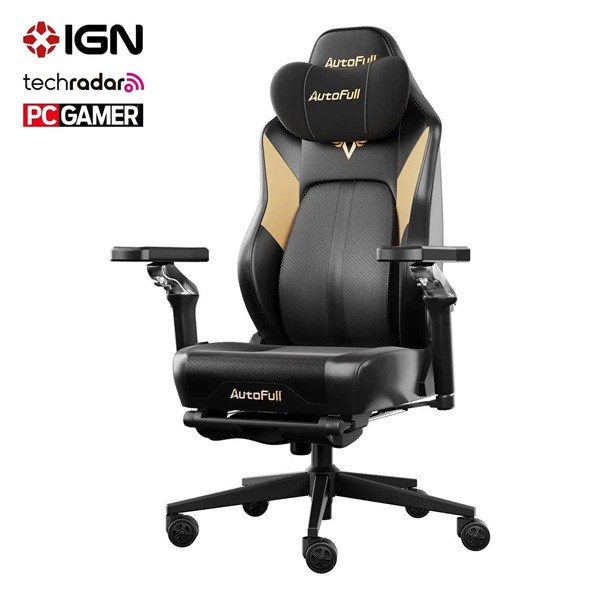
Among the brands that have made a credible case for ergonomic gaming furniture, AutoFull gaming chairs stand out for their deliberate focus on back support rather than aesthetics alone. Where many competitors lean heavily on racing-style visuals, AutoFull has invested in functional design elements that address the specific needs of users who sit for extended periods — making them a practical consideration for home office workers who game.
AutoFull’s lineup features independently adjustable lumbar systems that move vertically to target your specific spinal curve, a meaningful departure from fixed foam inserts that rarely land in the right position. Their seat foam is engineered for density rather than initial softness, which translates to consistent support after months of daily use rather than the gradual collapse common in budget alternatives. Headrest pillows with height and angle adjustment add cervical spine support during reclined gaming sessions, addressing a gap that standard office chairs typically leave unaddressed.
User feedback consistently highlights long-session comfort as a defining strength, with many reviewers noting reduced lower back fatigue compared to previous chairs. For home office workers seeking a single chair that handles both professional focus and weekend gaming without sacrificing body support at either end of the day, AutoFull gaming chairs represent a well-rounded option worth serious consideration.
Step-by-Step Guide to Choosing and Setting Up Your Chair
Assessing Your Needs and Budget
Before browsing options, take an honest inventory of how you actually use your chair. Track your daily sitting hours across both work and gaming, note where your current discomfort originates — lower back, neck, hips — and identify which adjustments you find yourself making most often. This self-audit shapes every decision that follows. Budget-wise, treat an ergonomic chair as a per-hour investment: a $400 chair used ten hours daily for three years costs less than a dollar per day, which reframes the price relative to the pain management costs it potentially replaces.
Key Selection Criteria
Narrow your shortlist using four concrete filters. First, adjustability range — confirm the chair’s height, lumbar, and armrest systems cover your specific body dimensions, not just average measurements. Second, size compatibility — seat width and weight capacity should match your build with room to spare. Third, material quality — prioritize high-density foam over 45kg/m³ and breathable cover materials if you run warm during long sessions. Fourth, look for ergonomic certifications from recognized bodies like BIFMA or similar standards organizations, which indicate the chair has been tested under sustained-use conditions rather than just static comfort evaluations.
Proper Setup for Optimal Back Support
Even the best ergonomic chair delivers mediocre results if configured incorrectly. Start with seat height: adjust until your feet rest flat on the floor with knees at roughly 90 degrees. Next, position the lumbar support so it presses gently into the natural inward curve of your lower back — typically between your hip crest and the bottom of your ribcage. Set armrests so your elbows rest at desk height with shoulders relaxed downward, not raised. Finally, angle the seat tilt slightly forward or keep it neutral to prevent posterior pelvic tilt, which is the root cause of most lower back strain during prolonged sitting.
Maintenance Tips for Longevity
Protecting your investment requires minimal but consistent effort. Wipe down PU leather or fabric surfaces weekly to prevent material degradation from sweat and dust. Check all adjustment mechanisms monthly — tighten any loose bolts and lubricate the recline mechanism annually with silicone spray to prevent stiffness. Rotate your sitting position slightly throughout the day rather than locking into one fixed angle, which distributes wear evenly across the foam and preserves cushion resilience significantly longer.
Investing in the Right Chair for Long-Term Back Health
Back pain doesn’t have to be the default price of a productive home office. As this guide has outlined, the right ergonomic chair addresses the root causes of lower back strain — poor lumbar alignment, inadequate seat depth, unsupported arms — rather than simply masking discomfort until the next workday begins. For home office workers who game, this matters doubly, because the hours don’t stop accumulating when the spreadsheets close.
The features that genuinely move the needle are adjustable lumbar support that targets your specific spinal curve, seat foam dense enough to maintain its shape after months of daily use, and recline functionality that lets you shift load distribution throughout the day. Versatile game room furniture that transitions seamlessly between professional and leisure use isn’t a compromise — it’s a smarter allocation of both space and budget.
Brands like AutoFull demonstrate that ergonomic integrity and gaming-ready design can coexist without sacrificing either. If you’ve been tolerating a chair that leaves you sore by midday, that tolerance is costing you more than comfort — it’s affecting your focus, your sleep, and your long-term spinal health. Take the self-audit seriously, apply the selection criteria outlined here, and set your chair up correctly from day one. Your back will register the difference within the first week.